User Impersonation with Laravel Nova

Quick note here: Impersonation is available for Laravel Nova v4(Silver Surfer)
My first thought was about the way the application on which I’m trying the impersonation is called authenticates the users and in this case is using Sanctum and maybe it interferes with the impersonation some how.
So I started to look into the Nova documentation how the impersonation is made, how it can be extend and so long and so forth.
Similarly to many other functionalities in Laravel or it’s Eco system is pretty simple and straight forward:
<?php

namespace App\Models;

use Illuminate\Contracts\Auth\MustVerifyEmail;
use Illuminate\Database\Eloquent\Factories\HasFactory;
use Illuminate\Foundation\Auth\User as Authenticatable;
use Illuminate\Notifications\Notifiable;
use Laravel\Nova\Auth\Impersonatable;
use Laravel\Sanctum\HasApiTokens;

class User extends Authenticatable
{
    use HasApiTokens, HasFactory, Impersonatable, Notifiable;

    // ...
}
You need to add Impersonatable trait to your User account adding this will give you:
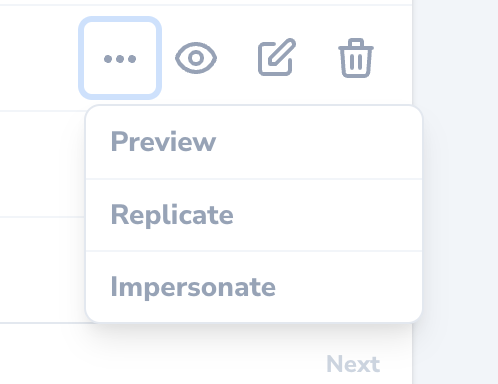
Additional menu element in the events menu using it you will be logged in as the user you’ve selected, which is pretty cool, right!
When impersonating a user, it shows in the menu in the top right corner of the screen:

When open the menu there is an option to stop impersonating :
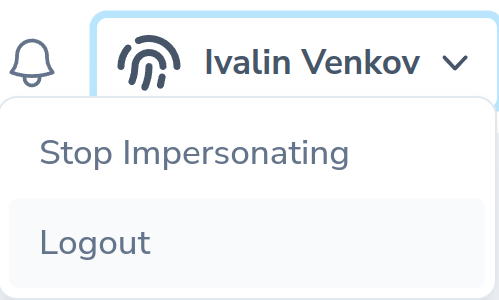
As I mentioned already installation is pretty standard(or as I like to say “The Laravel Way”)
Something important that is part of the installation, something that I’ve missed:
use Illuminate\Support\Facades\Gate;

/**
 * Determine if the user can impersonate another user.
 *
 * @return bool
 */
public function canImpersonate()
{
    return Gate::forUser($this)->check('viewNova');
}

/**
 * Determine if the user can be impersonated.
 *
 * @return bool
 */
public function canBeImpersonated()
{
    return true;
}
As mentioned in the documentation:
By default, any user that has permission to view the Nova dashboard can impersonate any other user. However, you may customize who can impersonate other users and what users can be impersonated by defining
canImpersonateandcanBeImpersonatedmethods on your application'sImpersonatablemodel
Which is true, but for my case it wasn’t in the User model there was a canImpersonate method, but it was set to false
/**
 * Determine if the user can impersonate another user.
 *
 * @return bool
 */
public function canImpersonate()
{
    return false;
}
At first I did not thought much of but after the 2 hours plus looking into sessions, guards, requests and routes I figured that something is off..
In the end I was able to fix it of course but, my advice here is to always check everything related to what you’re trying to achieve especially on legacy projects!
For me that was the easy part, making it work with the frond-end was the tricky part since there, we have Vue router with many of the routes requiring authentication which is essentially a variable user which is loaded from the back-end that determines when the user is authenticated.
Thanks to the cool things provided from the Laravel Nova config file, you can define two custom variables which determines where to redirect when impersonating and when to redirect after it stops impersonating:
    /*
    |--------------------------------------------------------------------------
    | Nova Impersonation Redirection URLs
    |--------------------------------------------------------------------------
    |
    | This configuration option allows you to specify a URL where Nova should
    | redirect an administrator after impersonating another user and a URL
    | to redirect the administrator after stopping impersonating a user.
    |
    */

    'impersonation' => [
        'started' => '/',
        'stopped' => '/nova',
    ],
So using those two I was able to muster up a away to impersonate user and the same time to authenticated in the frond-end so the impersonator will be able to access all the routes that require authentication.
Conclusion
Laravel Nova is an amazing tool, it provides you everything you need to administer your application, the simplified UI and the extremely useful documentation makes it one of the top admin panels for Laravel, of course here should be mentioned the price that comes with it, for it’s well worth it!
When working with legacy projects, be sure to check if not all the files and functionalities related to what you need to do, at least the most important ones, you never what changes could’ve been made for various reasons.
Always check and be sure that everything is in place and you will be able to finish the job, the proper way.
Share this post