Two-factor authentication in Laravel Nova

Two-factor authentication is a widely used as way of making login more secure. And when it comes to something like an admin panel it becomes even more important.
There are handy features for controlling access to the Laravel Nova using the IP, which is fine but it can be a bit of a headache when there are a dozen admins logging in it daily and most of them doing from different devices and different places.
So the 2FA it’s a viable solution, in order to add such functionality I’ve used: Nova Two Factor by Visanduma R & D
It’s easy to enough to install:
\\ Nova 5

composer require visanduma/nova-two-factor:~3
Publish the configuration
php artisan vendor:publish --provider="Visanduma\NovaTwoFactor\ToolServiceProvider"Use the trait in the model that you want to have the 2FA, in my case it was Admin :
<?php

namespace App\Models;

use Visanduma\NovaTwoFactor\ProtectWith2FA;

class Admin extends Authenticatable
{

    use ProtectWith2FA;
}
In order to add some additional functionality on Login you need to add the package’s middleware in the nova.php configuration file:
/*
    |--------------------------------------------------------------------------
    | Nova Route Middleware
    |--------------------------------------------------------------------------
    |
    | These middleware will be assigned to every Nova route, giving you the
    | chance to add your own middleware to this stack or override any of
    | the existing middleware. Or, you can just stick with this stack.
    |
    */

    'middleware' => [
        ...
        \Visanduma\NovaTwoFactor\Http\Middleware\TwoFa::class
    ],
And the last thing is to add the the package as a tool in NovaServiceProvide file:
<?php

class NovaServiceProvider extends NovaApplicationServiceProvider{

public function tools()
    {
        return [
            ...
            new \Visanduma\NovaTwoFactor\NovaTwoFactor()
            ...
        ];
    }
}
And if you don’t have custom main menu that’s about it when you log into your admin panel you will see the new menu on the left:
Press enter or click to view image in full size
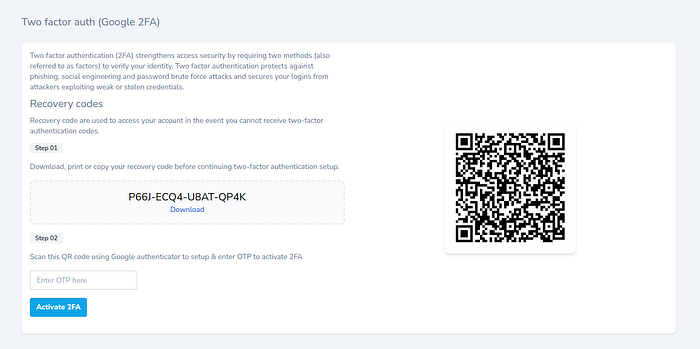
Source: https://github.com/Visanduma/nova-two-factor
that will be the page when the 2FA is not setup up, which is also a breeze to do.
But if you are like me and you have custom main menu, there is one more thing you need to do in order to be able to access the aforementioned page:
Nova::mainMenu(function (Request $request) {
     return [
         ...
         MenuSection::make('Two Factor Auth', [
            MenuItem::link('2FA', 'nova-two-factor'),
         ])->icon(config('nova-two-factor.menu_icon')),
         ...
    ];
});
You need to manually add the MenuItem to your menu in order to do that you need is:
namelinkicon
and that’s it now you will be able to see in your menu:
and that’s it, after the initial and if it’s enabled every time when you login you will be required to provide the OTP code in order to login.
Pro Tip: If you wish to remove the restriction by IP from the NovaServiceProvder , just return do:
    /**
     * Register the Nova gate.
     *
     * This gate determines who can access Nova in non-local environments.
     *
     * @return void
     */
    protected function gate()
    {
        Gate::define('viewNova', function (\App\Models\Admin $user) {
            return true;
        });
    }
do not remove the whole gate, trust me on that!
Conclusion
Security for Laravel Nova is a important thing, using 2FA is a great option to secure your implementation, it's easy to use and to implement plus it's a "modern" solution for such cases. Go on try it yourself you gonna love it.
Share this post